


Why Amazon Listings Underperform in Shopify & TikTok Shop
7 reasons your Amazon listings fail on Shopify and TikTok Shop, plus 8 Amazon listing optimization strategies to rebuild titles, images, copy, and catalog structure.
You had a product page that worked brilliantly on Amazon, so you pasted it onto your Shopify store and your TikTok Shop and waited. Nothing happened. It is a common story, and the answer isn’t that your product got worse. It is that Amazon listing optimization for a storefront or a feed barely resembles what worked on Amazon.
A listing is a product of its surroundings, and you just moved it somewhere with completely different rules. And that is exactly what we are going to sort out here. We will show you 7 reasons your Amazon listings struggle the moment they leave Amazon, then 8 fixes you can use to sell the same catalog across channels.
7 Reasons Your Amazon Listings Underperform on Shopify and TikTok Shop
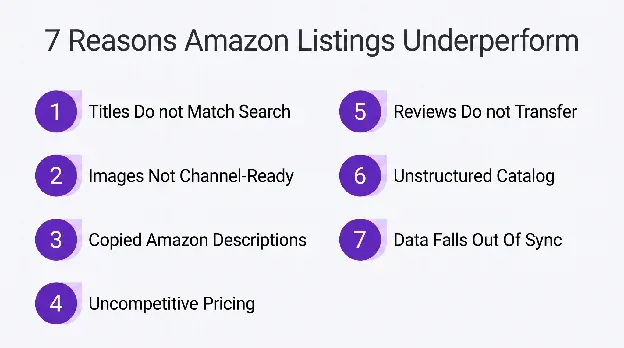
Before any fixing, it helps to understand why this even happens, because the instinct is to blame the product or the price when neither is the culprit. A listing that dominated on Amazon can faceplant elsewhere for reasons that have nothing to do with quality. Getting your Amazon listing optimization right somewhere new starts with knowing what actually breaks.
1. Product Titles Don’t Match How Shoppers Search
Think about how you wrote your Amazon title. You crammed your brand and every important keyword you could fit into one long string, because that is what the A9 search box rewards in Amazon search results and how people genuinely type there.
That string is doing a very specific job in a very specific place. Move it to a Shopify page, and it just looks broken… like nobody bothered to proofread. Drop it into a TikTok caption, and it gets shown to people who weren’t searching for anything. So it doesn’t give them much to go on.
Nobody scrolls TikTok typing out a forty-character spec string. They react to a hook. The title that made you money on Amazon is now costing you clicks elsewhere, because how people search has shifted toward plain, human phrasing.
2. Product Images Aren’t Optimized for Each Marketplace
Amazon basically dictates your photography. Pure white background, product dead center, because those are the rules and bending them gets your listing suppressed. So you learned to shoot that way, and inside Amazon it is fine, since everyone looks identical.
Take that same sterile shot to your own Shopify store, and it feels cheap, like a placeholder you meant to swap out later. It doesn’t whisper brand, it whispers drop-shipper.
And on TikTok Shop, already a $15.1 billion US channel built entirely on motion, a static cut-out photo doesn’t just do poorly. It is invisible. The feed runs on video, and your image isn’t one.
3. Product Descriptions Rely on Amazon Copy
Your Amazon description is probably a stack of bullet points, spec after spec, aimed at someone with ten tabs open comparing everything at once. That is the right call on Amazon, which is basically a comparison engine.
Paste those same bullets onto your own product page and the whole thing just stops working. There is no story, nothing that makes a person actually want the thing. Just specs that assume they have already decided to buy.
And since 59% of eCommerce sales now happen on mobile, that dense grey block is even rougher going, the kind of thing people thumb straight past on a phone without reading a word.
4. Pricing and Promotions Aren’t Competitive
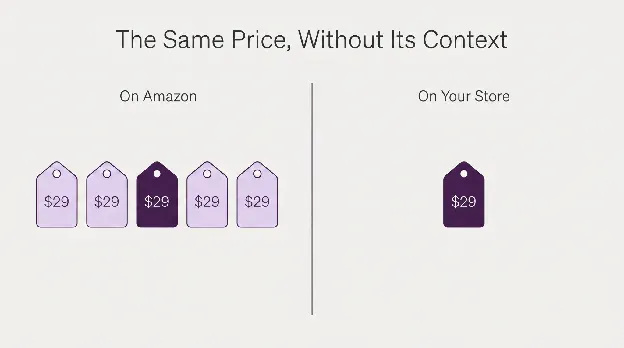
On Amazon, your price never stands alone. It is in a lineup of near-identical options, so online shoppers judge it against whatever is right next to it, and the Buy Box picks a winner for them.
Take that price to your own store, and the lineup vanishes. The number is just there with nothing beside it. And a shopper genuinely can’t tell if it is a great deal or a rip-off.
TikTok Shop makes it harder still. With more than 475,000 US shops fighting for the same few seconds of attention, a plain price with no offer behind it gives nobody a reason to stop scrolling.
5. Reviews and Social Proof Don’t Carry Over
An Amazon listing shows up already wrapped in trust. Thousands of positive reviews, a Prime badge, a returns process nobody thinks twice about. All of that does the persuading before your words even get a turn.
Every bit of that borrowed credibility stays behind on Amazon Brand Registry when you move the product to your own store. Same product listing, except now it is one stranger asking another to hand over a card.
Nothing about the copy changed. What changed is that the trust holding it up was never really yours, and you left it at the door on your way out.
6. Product Catalog Isn’t Structured for Marketplace Discovery
Amazon keeps every product in its own little silo, slotted into Amazon’s category tree, so you never really think about how your products connect. There is no reason to.
Shopify and TikTok Shop don’t work like that. They focus on collections and the links you draw between products yourself. And that is how one shopper ends up discovering a second and a third thing.
Import a flat Amazon catalog straight across, and it shows up as a heap of unrelated items. All the connective tissue these platforms use to walk people around your store simply isn’t there.
7. Inventory and Product Data Fall Out of Sync
The second your catalog exists in two places, it starts telling two different stories. You adjust product prices on Amazon or sell your very last unit, and that news never travels to your other channels on its own.
So a customer runs into something marked in stock that sold out yesterday, or a price that changed weeks ago. Little cracks, but each one shows up right when they were deciding whether to trust you.
And on a channel that barely knows your name, trust is the one thing you can’t afford to leak. Out-of-sync data undoes good listings faster than almost anything else you will do.
8 Amazon Listing Optimization Strategies for Shopify and TikTok Shop
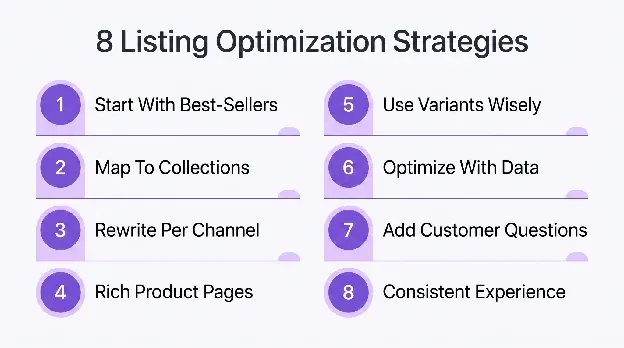
This is where real Amazon listing optimization for a new channel happens – taking a listing that was built for Amazon and rebuilding it for where it is now. Here are 8 strategies, roughly in the order that makes them easiest to tackle.
1. Start With Your Best-Selling Amazon Products First
Here’s the mistake almost everyone makes. They try to move the whole catalog at once. Two weeks in, they are fried, half the pages are rushed, and nothing is selling. You don’t need all of it live. You need your proven winners live and looking sharp, and Amazon already handed you the list of which ones those are.
- Pull your Amazon sales history from your Amazon Seller Central account and rank every product by units and revenue.
- Take just the top 20% and move those first, fully done, nothing rushed.
- Give each winner a real page of its own, never a bulk CSV import.
- Watch how they sell on the new channel before you add anything else.
Choosing your winners is only step one. The step people skip is giving those winners a home a first-time visitor can actually get around. A flat grid of forty best-sellers is barely better than dumping the whole catalog on someone.
It is worth studying how top sellers at Nootropics Depot have been organized. It solves a specific problem: a hundred winning products and a stranger who doesn’t know any of their names yet.
The filtering isn’t a single dropdown. It runs on four facets at once – benefit, type, form, and dietary restriction. Someone who knows they prefer capsules over powders, or wants to browse a specific type of supplement, can get there in a couple of clicks. A short intro up top even names a couple of standouts, which gives people a clear starting point before they ever touch a filter.
The lesson there has nothing to do with supplements. It is that when you bring your best-performing Amazon products onto Shopify or TikTok Shop, don’t just collect them on one page because they sold well elsewhere. Organize them around the ways people actually make buying decisions.
2. Map Every Product to the Right Category and Collection
On Amazon, you barely think about structure because the search bar takes care of most of it. People type, Amazon matches, done. On Shopify and TikTok Shop, shoppers browse more than they search, so how you group products is the difference between someone finding three things they love and bouncing after one.
- Group products into collections people actually browse, not around your internal SKU logic.
- Build subcollections for the ways buyers narrow down, like by use or size.
- Make sure every product is in at least one collection, with none orphaned.
- Name your collections after the words shoppers use, not your internal warehouse labels.
The problem starts when you have a complicated product range. If shoppers have to open five or six pages just to work out which one suits them, they are doing work your category page should have done for them. Good collections reduce that effort before anyone clicks into a product.
You can see that approach across Brondell’s water filter range. The collection makes it easy to compare key features of different types side by side, with enough information on the listing itself to distinguish countertop, under-sink, and reverse osmosis options before opening a product detail page.
Shoppers can also narrow the selection using filters such as installation type, filtration method, price, and availability, which steadily reduces the list to key product features that actually fit their situation.
That is a useful pattern to follow regardless of what you sell. A collection should answer the first round of buying questions before someone visits a product page. When shoppers can rule products in or out from the collection itself, they reach a decision faster and spend less time bouncing between pages just to understand the differences.
3. Rewrite Listings Around Platform-Specific Search Intent
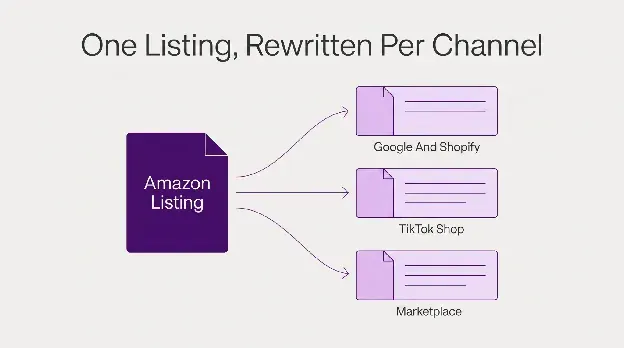
Good search engine optimization starts with understanding how people search on each platform. On Google, they type a whole question. In a Shopify search bar, they use a word or two. On TikTok, they aren’t searching at all – they are getting interrupted by something that caught their eye.
This is where Amazon SEO stops being enough on its own. One block of Amazon backend keywords can’t possibly speak all three languages.
- Conduct keyword research by looking up how buyers actually phrase this product on each channel, not just Amazon. Don’t chase search volumes.
- Write a clean, human title around long-tail keywords for Shopify and Google. No keyword stuffing.
- Open your TikTok copy with a real hook, not a brand-and-model code string.
- Rewrite the body copy around each platform’s target keywords and intent before moving to the next.
One thing becomes obvious after you do this a few times. Rewriting the same product for three or four channels is not just copywriting. Every platform wants a different format and different keywords. And doing that manually isn’t easy.
That is exactly where we at Kua.ai can help. Import a product once, and we generate channel-specific listings, product pages, blogs, and social posts for Shopify, TikTok Shop, Amazon, Etsy, WooCommerce, and more.
We adapt the relevant keywords, structure, tone, and formatting to match the platform and maximize sales performance. We also support more than 20 sales channels and 50+ languages, so expanding into new marketplaces doesn’t mean starting every listing from scratch.
4. Build Complete Product Pages With Rich Buying Information
Amazon shoppers turn up already sold. They searched for the exact thing and just want to double-check a couple of specs. A big share of the potential buyers hitting your Shopify or TikTok page are earlier than that, still weighing whether they even want it. And a stripped-down spec list gives them nothing to hold onto.
- Put the top pre-purchase questions right on the page and highlight key features nearby, not on a hidden FAQs page.
- Show the product with high-quality images of it actually being used on a counter or product stand, not only white-background studio product shots.
- Add sizing, fit, or compatibility notes anywhere a potential customer is likely to hesitate.
- Write a short who-it’s-for line so browsers can qualify themselves fast.
5. Use Product Variants Strategically Instead of Creating Separate Listings
On Amazon, splitting every color and size into its own listing can make sense, each one chasing its own rank. On Shopify and TikTok Shop, it backfires. Variants belong inside one product. And when you split them out anyway, you slice your reviews and your ranking signals across a dozen weak pages that each start again from zero.
- Combine your colors and sizes into one product with clean and selectable variants.
- Pull every review onto the single parent product so your proof stacks up.
- Give each variant one clear photo so the difference is obvious instantly.
- Keep variant SKUs mapped so your stock and reporting never drift apart.
6. Optimize Listings With Marketplace Performance Data
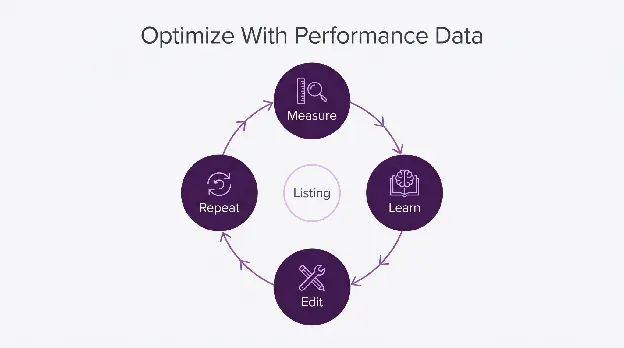
The best part of moving off Amazon is that you finally own your data. Every channel shows you what people searched for and where they gave up. That is not a number to glance at once a quarter. It is the thing telling you which listing to fix next, and exactly what to change on it.
- Read each channel’s search-terms report and add keywords that actually convert (both primary and secondary keywords).
- Track click-through and conversion per listing, then fix your worst performers first.
- A/B test your titles and lead images wherever the platform actually allows it.
- Review it monthly and turn your clearest wins into changes that drive sales.
7. Strengthen Listings With Customer Feedback and Questions
Your customers will write better listing copy than you ever could… if you let them. Every question before a sale and every gripe after one is a hole in your page that somebody just pointed straight at. Amazon hides all of it away in Q&A tabs and reviews. On your own channels, you can fold it right back into the listing where it actually helps.
- Mine positive feedback alongside support tickets for the questions that keep coming up.
- Answer each recurring question directly in the copy or an on-page FAQ.
- Use your customers’ actual words in the copy, not in-house marketing speak.
- Refresh the page whenever a brand-new question starts showing up a lot.
The challenge is knowing which questions deserve a place on the product page and which belong somewhere else. Some are quick buying questions. Others need more explanation than a listing can reasonably hold. Trying to squeeze everything into product copy makes the page harder to scan.
That is where supporting content becomes useful. Consider this guide on sweetbreads, which has taken this approach with a topic that regularly confuses buyers and culinary professionals. It answers the kinds of questions people repeatedly ask.
The page doesn’t just explain what sweetbreads are. It also includes a dedicated Q&A section that addresses the practical questions readers are most likely to have.
Rather than leaving those answers in comments or repeating them across multiple pages, the site brings them together in one place where future readers can find them easily. It is a good reminder that recurring customer questions are the best guide for deciding what information deserves a permanent place in your content.
The same principle works for any product catalog. If the same question keeps appearing in reviews or support tickets and the answer is too detailed for a listing, build a resource around it and link to it from the product page.
Your listing stays focused on helping someone buy, while the supporting content backed by exceptional customer service handles the deeper questions that would otherwise keep coming back.
8. Create a Consistent Cross-Channel Product Experience
Someone might find you on TikTok today and visit your Shopify store next week. If the photos and the details don’t match, it doesn’t read as one brand. It reads as either careless or a knock-off. Sameness across channels is dull to maintain, and it is exactly what increases sales by making you look like the real thing rather than a fly-by-night reseller.
- Keep one master product record and adapt it per channel, never from scratch.
- Match your core photos and key specs everywhere so nothing ever contradicts.
- Reuse the same brand voice and product story on every channel you sell on.
- Keep it all aligned even when you sell into new languages or regions.
Conclusion
The real fix is a change of habit. Stop porting your Amazon listings and start translating them, because each channel is its own place with its own shoppers and rules. Treat Amazon listing optimization for Shopify and TikTok as a rebuild, not a copy-paste, and the result will be more sales.
That rebuild is exactly what we made Kua.ai for. It takes one product import and generates listing-ready content for every channel you sell on, from Amazon to TikTok Shop, with the keyword research built in. If redoing every listing by hand sounds like a month you don’t have spare, try Kua.ai for free.
